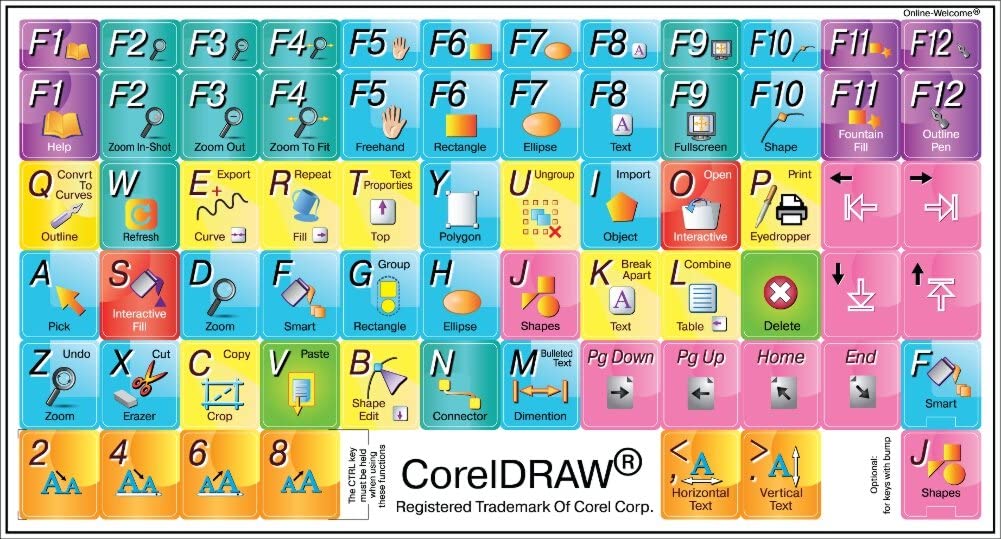


The following CorelDraw shortcut keys provide an outline of the most commonly used functions in CorelDraw. It is impossible to provide a complete set of shortcut keys since there are hundreds of such shortcuts. With the help of this software, you can control images, produce some designs and do a lot of other picture modelling tasks. CorelDRAW was one of the first tools to provide colour vector-graphics editing potential on a desktop computer.
| Align Bottom | B | Aligns selected objects to the bottom |
| Align Centers Horizontally | E | Horizontally aligns the centres of the selected objects |
| Align Centers Vertically | C | Vertically aligns the centres of the selected objects |
| Align Left | L | Aligns selected objects to the left |
| Align Right | R | Aligns selected objects to the right |
| Align To Baseline | Alt+F12 | Aligns text to the baseline |
| Align Top | T | Aligns selected objects to the top |
| Artistic Media | I | Draws curves and applies Preset, Brush, Spray, Calligraphic or Pressure Sensitive effe |
| Back One | Ctrl+PgDn | Back One |
| Break Apart | Ctrl+K | Breaks apart the selected object |
| Brightness/Contrast/Intensity | Ctrl+B | Brightness/Contrast/Intensity… |
| Bring up Property Bar | Ctrl+Enter | Brings up the Property Bar and gives focus to the first visible item that can be tabbed to |
| Center to Page | P | Aligns the centres of the selected objects to the page |
| Character Formatting | Ctrl+T | Character Formatting |
| Colour Balance… | Ctrl+Shift+B | Colour Balance |
| Combine | Ctrl+L | Combines the selected objects |
| Contour | Ctrl+F9 | Opens the Contour Docker Window |
| Convert | Ctrl+F8 | Converts artistic text to paragraph text or vice versa |
| Convert Outline To Object | Ctrl+Shift+Q | Converts an outline to an object |
| Convert To Curves | Ctrl+Q | Converts the selected object to a curve |
| Copy | Ctrl+C | Copies the selection and places it on the Clipboard |
| Copy | Ctrl+Insert | Copies the selection and places it on the Clipboard |
| Cut | Ctrl+X | Cuts the selection and places it on the Clipboard |
| Cut | Shift+Delete | Cuts the selection and places it on the Clipboard |
| Delete | Delete | Deletes the selected object(s) |
| Distribute Bottom | Shift+B | Distributes selected objects to the bottom |
| Distribute Centers Horizontally | Shift+E | Horizontally Distributes the centres of the selected objects |
| Distribute Centers Vertically | Shift+C | Vertically Distributes the centres of the selected objects |
| Distribute Left | Shift+L | Distributes selected objects to the left |
| Distribute Right | Shift+R | Distributes selected objects to the right |
| Distribute Spacing Horizontally | Shift+P | Horizontally Distributes the space between the selected |
| Distribute Spacing Vertically | Shift+A | Vertically Distributes the space between the selected objects |
| Distribute Top | Shift+T | Distributes selected objects to the top |
| Duplicate | Ctrl+D | Duplicates the selected object(s) and offsets by a specified amount |
| Duplicate In Place | + | Duplicates the selected object(s) at their current location |
| Dynamic Guides | Alt+Shift+D | Shows or hides the Dynamic Guides (toggle) |
| Edit Text… | Ctrl+Shift+T | Opens the Edit Text dialogue box |
| Ellipse | F7 | Draws ellipses and circles; double-clicking the tool opens the Toolbox tab of the Option |
| Envelope | Ctrl+F7 | Opens the Envelope Docker Window |
| Eraser | X | Erases part of a graphic or splits an object into two closed paths |
| Exit | Alt+F4 | Exits CorelDRAW and prompts to save the active drawing |
| Export… | Ctrl+E | Exports text or objects to another format |
| Font Size Decrease | Ctrl+NUMPAD2 | Decreases font size to previous point size |
| Font Size Increase | Ctrl+NUMPAD8 | Increases font size to next point size |
| Font Size Next Combo Size | Ctrl+NUMPAD6 | Increase the font size to next setting in Font Size List |
| Font Size Previous Combo Size | Ctrl+NUMPAD4 | Decrease font size to the previous setting available in the Font Size List |
| Forward One | Ctrl+PgUp | Forward One |
| Fountain Fill… | F11 | Applies fountain fills to objects |
| Freehand | F5 | Draws lines and curves in Freehand mode |
| Full-Screen Preview | F9 | Displays a full-screen preview of the drawing |
| Graph Paper | D | Draws a group of rectangles; double-clicking opens the Toolbox tab of the Options dial |
| Graphic and Text Styles | Ctrl+F5 | Opens the Graphic and Text Styles Docker Window |
| Group | Ctrl+G | Groups the selected objects |
| Hand | H | Hand Tool |
| Horizontal Text C | Ctrl+, | Changes the text to the horizontal direction |
| Hue/Saturation/Lightness… | Ctrl+Shift+U | Hue/Saturation/Lightness |
| Import… | Ctrl+I | Imports text or objects |
| Insert Symbol Character | Ctrl+F11 | Opens the Insert Character Docker Window |
| Interactive Fill | G | Adds a fill to object(s); clicking and dragging on object(s) applies a fountain fill |
| Lens | Alt+F3 | Opens the Lens Docker Window |
| Linear | Alt+F2 | Contains functions for assigning attributes to linear dimension lines |
| Macro Editor… | Alt+F11 | Macro Editor… |
| Mesh Fill | M | Converts an object to a Mesh Fill object |
| Micro Nudge Down | Ctrl+DnArrow | Nudges the object downward by the Micro Nudge factor |
| Micro Nudge Left | Ctrl+LeftArrow | Nudges the object to the left by the Micro Nudge factor |
| Micro Nudge Right | Ctrl+RightArrow | Nudges the object to the right by the Micro Nudge factor |
| Micro Nudge Up | Ctrl+UpArrow | Nudges the object upward by the Micro Nudge factor |
| Navigator | N | Brings up the Navigator window allowing you to navigate to any object in the document |
| New | Ctrl+N | Creates a new drawing |
| Next Page | PgDn | Goes to the next page |
| Nudge Down | narrow | Nudges the object downward |
| Nudge Left | LeftArrow | Nudges the object to the left |
| Nudge Right | right arrow | Nudges the object to the right |
| Nudge Up | UpArrow | Nudges the object up |
| Open… | Ctrl+O | Opens an existing drawing |
| Options… | Ctrl+J | Opens the dialog for setting CorelDRAW options |
| Outline Color… | Shift+F12 | Opens the Outline Color dialog box |
| Outline Pen… | F12 | Opens the Outline Pen dialog box |
| Pan Down | Alt+DnArrow | Pan Down |
| Pan Left | Alt+LeftArrow | Pan Left |
| Pan Right | Alt+RightArrow | Pan Right |
| Pan Up | Alt+UpArrow | Pan Up |
| Paste | Ctrl+V | Pastes the Clipboard contents into the drawing |
| Paste | Shift+Insert | Pastes the Clipboard contents into the drawing |
| Place Inside Container… | Ctrl+1 | Places selected object(s) into a PowerClip container object |
| Polygon | Y | Draws polygons |
| Position | Alt+F7 | Opens the Position Docker Window |
| Previous Page | PgUp | Goes to the previous page |
| Print… | Ctrl+P | Prints the active drawing |
| Properties | Alt+Enter | Allows the properties of an object to be viewed and edited |
| Record Temporary Macro | Ctrl+Shift+R | Record Temporary Macro |
| Rectangle | F6 | Draws rectangles; double-clicking the tool creates a page frame |
| Redo | Ctrl+Shift+Z | Reverses the last Undo operation |
| Refresh Window | Ctrl+W | Redraws the drawing window |
| Repeat | Ctrl+R | Repeats the last operation |
| Rotate | Alt+F8 | Opens the Rotate Docker Window |
| Run Temporary Macro | Ctrl+Shift+P | Run Temporary Macro |
| Save As… S | Ctrl+Shift+ | Saves the active drawing with a new name |
| Save… | Ctrl+S | Saves the active drawing |
| Scale | Alt+F9 Window | Opens the Scale Docker |
| Select all | Ctrl+A | Select all objects on the active page |
| Shape | F10 | Edits the nodes of an object; double-clicking the tool selects all nodes on the selected |
| Size | Alt+F10 Window | Opens the Size Docker |
| Smart Drawing | Shift+S Dbl-click | opens Smart Drawing Tool options; Shift+drag backwards over line erases |
| Snap to Grid | Ctrl+Y | Snaps objects to the grid (toggle) |
| Snap to Objects | Alt+Z | Snaps objects to other objects (toggle) |
| Spell Check… | Ctrl+F12 | Opens the Spell Checker; checks the spelling of the selected text |
| Spiral | A | Draws spirals; double-clicking opens the Toolbox tab of the Options dialogue |
| Step and Repeat… | Ctrl+Shift+D | Shows Step and Repeat docker |
| Stop Recording | Ctrl+Shift+O | Stop Recording |
| Super Nudge Down | Shift+DnArrow | Nudges the object downward by the Super Nudge factor |
| Super Nudge Left | Shift+LeftArrow | Nudges the object to the left by the Super Nudge factor |
| Super Nudge Right | Shift+RightArrow | Nudges the object to the right by the Super Nudge factor |
| Super Nudge Up | Shift+UpArrow | Nudges the object upward by the Super Nudge factor |
| Symbol Manager | Ctrl+F3 | Symbol Manager Docker |
| Text | F8 | Adds text; click on the page to add Artistic Text; click and drag to add Paragraph Text |
| To Back Of Layer | Shift+PgDn | To Back Of Layer |
| To Back Of Page | Ctrl+End | To Back Of Page |
| To Front Of Layer | Shift+PgUp | To Front Of Layer |
| To Front Of Page | Ctrl+Home | To Front Of Page |
| Toggle Pick State | Ctrl+Space | Toggles between the current tool and the Pick tool |
| Toggle View | Shift+F9 | Toggles between the last two used view qualities |
| Undo | Ctrl+Z | Reverses the last operation |
| Undo | Alt+Backspace | Reverses the last operation |
| Ungroup | Ctrl+U | Ungroups the selected objects or group of objects |
| Uniform Fill… | Shift+F11 | Applies uniform colour fills to objects |
| Use bullets | Ctrl+M | Show/Hide Bullet |
| Vertical Text | Ctrl+. | Changes the text to vertical |
| View Manager | Ctrl+F2 | Opens the View Manager Docker Window |
| What’s This? | Shift+F1 | What’s This? Help |
| Zoom | Z | Zoom Tool |
| Zoom One-Shot | F2 | |
| Zoom Out | F3 | Zoom Out |
| Zoom To Fit | F4 | Zoom To All Objects |
| Zoom To Page | Shift+F4 | Zoom To Page |
| Zoom To Selection | Shift+F2 | Zoom To Selected |